
.png)
Description
Download 1001 Fonts – Free High‑Quality Font Library for Designers
Overview
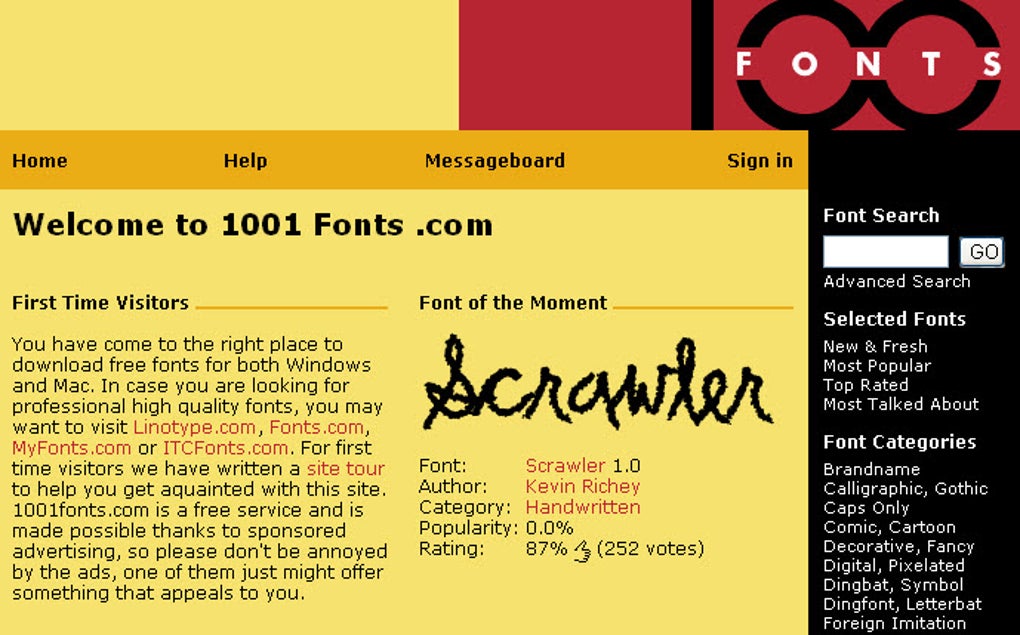
If you work in graphic design, advertising, web development, or any visual‑communication field, the right typeface can be the difference between a mediocre layout and a compelling visual story. 1001 Fonts answers that need by offering a massive catalog of free, high‑quality fonts that you can download instantly. The platform hosts more than 30 distinct categories—including decorative, comic, holiday, handwritten, and many niche styles—so designers of every taste can find a typeface that matches their project’s tone. Each font is uploaded directly by its creator, guaranteeing originality and often providing a link to the designer’s portfolio for further collaboration. The site’s user‑friendly navigation lets you sort fonts by popularity, newest uploads, or even specific tags, while a built‑in rating system lets the community surface the best‑rated typefaces. Though the site is ad‑supported, the download process itself is quick: click a category, select a font, and the file begins downloading immediately, usually in under a second because font files are typically small. Beyond the fonts themselves, 1001 Fonts includes an active message board where you can ask for advice, discuss typography trends, or simply share your latest finds. This blend of extensive variety, community interaction, and hassle‑free downloading makes 1001 Fonts a go‑to resource for anyone looking to enrich their typographic toolbox without spending a dime.
Key Features of 1001 Fonts
- Over 30 Font Categories: From classic serifs to quirky hand‑drawn scripts, the platform categorises fonts into intuitive groups that simplify browsing.
- Free & Immediate Downloads: All fonts are available at no cost, and the download starts as soon as you click the “Download” button.
- User Rating System: Community members can rate each font, helping the most popular and well‑crafted typefaces rise to the top of the list.
- Creator‑Driven Uploads: Fonts are uploaded directly by designers, ensuring authenticity and often linking back to the creator’s portfolio.
- Search & Filter Options: Advanced filters let you narrow results by style, popularity, newest, or specific tags like “vintage” or “modern”.
- Active Community Forum: A built‑in message board enables designers to discuss typography, ask for recommendations, and share project feedback.
- Responsive Design: The website adapts to desktop, tablet, and mobile browsers, so you can browse and download fonts on the go.
- License Transparency: Each font page displays licensing information, making it clear whether the typeface can be used for commercial projects.
Installation & Usage Instructions
Getting a new font from 1001 Fonts onto your computer is straightforward, and the process is similar across Windows, macOS, Android, and iOS. Follow these steps to ensure a smooth installation:
Step‑by‑Step Guide for Desktop (Windows & macOS)
- Visit 1001fonts.com and browse or search for the desired font.
- Click the font’s thumbnail to open its detail page. Review the preview, licensing terms, and user ratings.
- Press the green Download button. The file will usually be a .zip archive containing the .ttf or .otf files.
- Locate the downloaded .zip file in your Downloads folder and extract its contents.
- For Windows, right‑click the .ttf/.otf file and select Install. The font becomes instantly available in Microsoft Word, Photoshop, and other applications.
- For macOS, double‑click the .ttf/.otf file, then click the Install Font button in the Font Book preview window. The font will appear in the “User” collection.
Mobile Installation (Android & iOS)
While 1001 Fonts does not offer a dedicated mobile app, you can still use downloaded fonts on Android and iOS devices with a few extra steps:
- Android: Transfer the .ttf/.otf files to your device via USB or cloud storage. Install a font‑manager app such as iFont or FontFix, then import the fonts. Some launchers also allow direct font changes.
- iOS: Use the Files app to locate the downloaded font, then tap the file and select “Share → Open in Font Book” (or a similar third‑party app). iOS 13+ supports custom fonts in many apps once they are added to the system settings under Settings → General → Fonts.
Best Practices for Using Free Fonts
Even though 1001 Fonts provides free typefaces, it’s essential to respect licensing. Most fonts are offered for personal use, while some allow commercial usage with attribution. Always double‑check the license displayed on the font’s page before incorporating it into client work or products for sale. Additionally, keep a backup of the original .zip files in a dedicated “Fonts” folder so you can reinstall or share them with teammates without re‑downloading.
Compatibility & System Requirements
The fonts hosted on 1001 Fonts are standard TrueType (.ttf) or OpenType (.otf) files, meaning they are compatible with virtually every modern operating system and software suite. Below is a quick compatibility matrix:
- Windows 7, 8, 10, 11: Fully supported. Install via right‑click → Install or copy to C:\Windows\Fonts.
- macOS 10.12 Sierra and later: Supported through Font Book or direct drag‑and‑drop to the Fonts folder.
- Linux distributions (Ubuntu, Fedora, etc.): Place .ttf/.otf files in the ~/.fonts directory or use the system font manager.
- Android 5.0+: Requires a third‑party font manager for system‑wide use; supported in most design apps that allow custom fonts.
- iOS 13+: Supports custom fonts added through Settings → General → Fonts after installation via a compatible app.
Because the files are lightweight, they load quickly in design software such as Adobe Creative Cloud, Sketch, Figma, and even web‑based editors like Canva. When using fonts on the web, you can convert them to web‑font formats (WOFF, WOFF2) using free online converters, ensuring optimal performance across browsers.
Pros and Cons
Pros
- Vast library with over 30 categories and thousands of free fonts.
- Instant, no‑cost downloads with minimal file sizes.
- User‑driven rating system highlights high‑quality typefaces.
- Direct uploads from designers ensure fresh and unique fonts.
- Responsive website works well on desktop and mobile browsers.
- Active community forum for advice and inspiration.
- Clear licensing information for each font.
Cons
- Advertisement placements can be distracting, especially on slower connections.
- No dedicated desktop or mobile app; browsing is web‑only.
- Some fonts lack comprehensive commercial licensing, requiring extra verification.
- Font preview images are static; dynamic preview (type your own text) is limited.
Frequently Asked Questions
Is it legal to use 1001 Fonts for commercial projects?
Each font on 1001 Fonts displays its own license terms. Many fonts are free for personal use only, while others allow commercial use with or without attribution. Always read the license information provided on the font’s detail page before using it in client work or products for sale.
Do I need to create an account to download fonts?
No. Downloading a font is completely free and does not require registration. However, creating an account lets you rate fonts, save favorites, and participate in the community forum.
Can I preview a font with my own custom text before downloading?
The site offers a basic preview where you can type a short phrase, but the functionality is limited compared to dedicated font‑preview tools. For a deeper look, you can download the font and test it in your preferred design software.
Are the fonts compatible with web design (e.g., CSS @font-face)?
Yes. Most fonts are provided as .ttf or .otf files, which can be converted to web‑optimized formats (WOFF, WOFF2) using free online converters. After conversion, you can embed them in CSS with the @font-face rule.
How often is the font library updated?
New fonts are added daily by designers worldwide. The “Newest Uploads” filter showcases the latest additions, ensuring the library stays fresh and current with design trends.
Conclusion & Call to Action
In the fast‑moving world of graphic design, having a reliable source of high‑quality, free fonts can dramatically accelerate your workflow and spark creativity. 1001 Fonts delivers exactly that: a massive, well‑organized library, instant downloads, clear licensing, and an engaged community—all without a price tag. While the ad placements may occasionally interrupt the browsing experience, the overall value far outweighs this minor inconvenience. Whether you’re a seasoned typographer or a beginner looking to experiment, 1001 Fonts equips you with the tools you need to craft compelling visual narratives. Ready to expand your typographic arsenal? Visit 1001 Fonts now, download your first free font, and let your designs speak louder.
Guides & Tutorials for 1001 Fonts
How to install 1001 Fonts
- Click the Preview / Download button above.
- Once redirected, accept the terms and click Install.
- Wait for the 1001 Fonts download to finish on your device.
How to use 1001 Fonts
This software is primarily used for its core features described above. Open the app after installation to explore its capabilities.
User Reviews for 1001 Fonts 0
No reviews found




